


DIY: Install Tracking System


Thread Starter
Registered!!
Joined: Apr 2007
Posts: 16
Likes: 0
From: NYC
Rep Power: 0 
DIY: Install Tracking System
This is based on my 94' install. Sorry no pics, but I hope this helps!
Parts needed:
MFC Anywhere System, Wire cutters, electrical tape, 2 automotive 30A relays, test light, self tap screws.
12volts white + steering column
Starter black/white + steering column
Ignition black/yellow + steering column
Power Lock green/white - 2pin plg blue-taped to
Power Unlock green/red - blue plg behind f-box
Parking Lights+ red/black at fuse box or d.k.p
Door Trigger lt. green/red - driver kick panel
Trunk/Hatch Pin grn/blk 2 sil.dot - blue conn. above fusbx
Tachometer blue AC 2-pin conn. near dist.
Horn Trigger blu/grn, blu/red - at steering column
Note: The "Modem/Reciever" does not have to be under the dash or rear deck in order to get a GPS "LOCK". I highly recommend hiding this unit!

Once everything is in, turn the mobile device "ON" and let the software load. You'll see functions on the device: LOCK, UNLOCK, REMOTE START, FUEL CUTOFF etc. Press each one and it should trigger each of the functions. Once everything works, log onto the tracking website and enter in your username and password. You will be able to view the location of your vehicle and trigger the functions from online.
Note: If it does not trigger, check to see if the modem is ON. Next, trigger your alarm system and wait a few seconds to see if you get the SMS text on your cell phone and email message on the computer that your alarm went off. Lastly, turn the car ON and check online to see if your RPM's are in idle mode and to see if the car is on. All of this will be indicated under the GPS map location.
EDIT: One last thing.. Turn the car ON by turning the key in the ignition. Then log into your account and click on "disable". If the car does not shut off, then recheck the relays. Should be wired as negative trigger outputs based on the diagram.
Click here to see more info about the web testing
Parts needed:
MFC Anywhere System, Wire cutters, electrical tape, 2 automotive 30A relays, test light, self tap screws.
12volts white + steering column
Starter black/white + steering column
Ignition black/yellow + steering column
Power Lock green/white - 2pin plg blue-taped to
Power Unlock green/red - blue plg behind f-box
Parking Lights+ red/black at fuse box or d.k.p
Door Trigger lt. green/red - driver kick panel
Trunk/Hatch Pin grn/blk 2 sil.dot - blue conn. above fusbx
Tachometer blue AC 2-pin conn. near dist.
Horn Trigger blu/grn, blu/red - at steering column
Note: The "Modem/Reciever" does not have to be under the dash or rear deck in order to get a GPS "LOCK". I highly recommend hiding this unit!
Once everything is in, turn the mobile device "ON" and let the software load. You'll see functions on the device: LOCK, UNLOCK, REMOTE START, FUEL CUTOFF etc. Press each one and it should trigger each of the functions. Once everything works, log onto the tracking website and enter in your username and password. You will be able to view the location of your vehicle and trigger the functions from online.
Note: If it does not trigger, check to see if the modem is ON. Next, trigger your alarm system and wait a few seconds to see if you get the SMS text on your cell phone and email message on the computer that your alarm went off. Lastly, turn the car ON and check online to see if your RPM's are in idle mode and to see if the car is on. All of this will be indicated under the GPS map location.
EDIT: One last thing.. Turn the car ON by turning the key in the ignition. Then log into your account and click on "disable". If the car does not shut off, then recheck the relays. Should be wired as negative trigger outputs based on the diagram.
Click here to see more info about the web testing
Last edited by DK888; Apr 12, 2007 at 06:03 AM.


Thread Starter
Registered!!
Joined: Apr 2007
Posts: 16
Likes: 0
From: NYC
Rep Power: 0 Re: DIY: Install Tracking System
Thanks boosted.es2, this was my first write up and I thought I'd get negative comments for not having pics. Actually, I did take pics but got rid of them b/c I forgot which wire was what and didn't have the time to sort it all out. Saved myself about $150 doing the install and only took a little over an hour to do vs. going to the shop and paying them, plus I didn't want anyone to know where I installed the unit. Otherwise I'd have to make them disappear. I've heard that some installers at various shops usually go back and steal customer's stuff b/c they installed the security and they know to get in. 

Thread Starter
Registered!!
Joined: Apr 2007
Posts: 16
Likes: 0
From: NYC
Rep Power: 0 Re: DIY: Install Tracking System
Sure! I need a vacation out of the city! 
It wasn't hard at all! The instructions were very straight forward and it was actually easier than installing an amplifier! I can get wiring diagrams of the car's security, audio and accessories for you if you need. Just let me know and I'll help ya.
It wasn't hard at all! The instructions were very straight forward and it was actually easier than installing an amplifier! I can get wiring diagrams of the car's security, audio and accessories for you if you need. Just let me know and I'll help ya.
Thread Starter
Registered!!
Joined: Apr 2007
Posts: 16
Likes: 0
From: NYC
Rep Power: 0 Re: DIY: Install Tracking System
I got this new application on my cell phone to control my MFC Anywhere System.
Control the MFC Anywhere System with the Anywhere Control application for FREE! Download: CLICK HERE
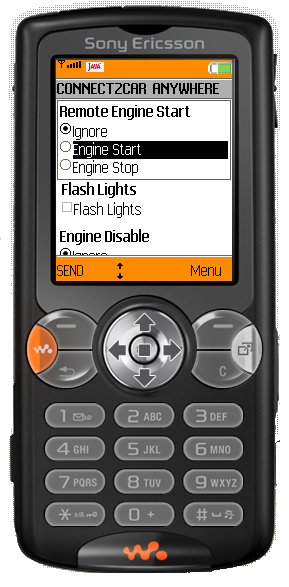
Control the MFC Anywhere System with the Anywhere Control application for FREE! Download: CLICK HERE


Thread Starter
Registered!!
Joined: Apr 2007
Posts: 16
Likes: 0
From: NYC
Rep Power: 0 Re: DIY: Install Tracking System
I paid $380 for the system. Get Connected with the MFC Anywhere System HERE
Also, I found a better DIY tutorial here: http://www.diyhappy.com/how-to-insta...n-your-ride-2/
Also, I found a better DIY tutorial here: http://www.diyhappy.com/how-to-insta...n-your-ride-2/

Thread
Thread Starter
Honda Civic Forum
Replies
Last Post
Touge
Canada East
1
Jun 18, 2015 11:49 PM
Touge
Ottawa
0
Jun 5, 2015 11:15 PM
Youshoe
7th Generation Civic 2001 - 2005
8
May 22, 2015 09:36 PM
Touge
Canada East
0
May 20, 2015 10:54 PM


