


LogicWavelength, drew22mader and dirtySAMURAIs Guide Automotive Photography *NEW PIX*
 09-24-2006
#1
7th Gen Photographer
Thread Starter
iTrader: (2)

Join Date: Mar 2004
Location: Atlantic City, NJ
Age: 40
Posts: 951
Likes: 0
Received 0 Likes
on
0 Posts
Rep Power: 255 

LogicWavelength, drew22mader and dirtySAMURAIs Guide Automotive Photography *NEW PIX*
Updated on Sept 11, 2007
At the end of the guide is a link to some new pointers! A bigger, better update coming soon with the new weather!
AUTOMOTIVE PHOTOGRAPHY
by
 LogicWavelength
 drew22mader and
 dirtySAMURAI
This guide will follow through a few concepts which are key to taking good photographs in general, but more specifically... pictures of our cars. The first section is on basic composition, as anyone with a point-and-shoot can at least aim properly. The second section is for those lucky enough to have a dSLR or at least an advanced P&S. The final section is a walkthrough on some tips and tricks for post-processing in Adobe PhotoShop.
COMPOSITION
by LogicWavelength
Location

The first thing you need to consider is location. Never take a picture of your car with a busy background. It should always be something neutral, or at least something that draws your attention to the car. Tunnels, forests/trees, parking garages or an alleyway are popular choices among amatuers as well as the magazines.


Next, position your car at an angle you like (obviously move yourself as well as the car for more shots) and angle the front wheels so that the wheel is facing you, not the tire tread.
The Rule of Thirds

This is a big one. When viewing a photograph, imagine making it a grid of 9 sections... basically... cutting in 3rds top to bottom and left to right. You always want to place the subject on one of these imaginary lines.... NEVER, EVER IN THE MIDDLE. It leads to a more interesting visual setup and will instantly make you look like you know what the heck you're doing. Some things to make note of... always leave the empty space in front of the car. It's your choice to have the car in the top 3rd or the bottom 3rd, but always have the extra space in front. This concept is called "walking room" or "leading the subject" (in video). However, in some cases its OK to center one of the two axis - but always have at least one at a 3rd.
Lighting
SUNRISE/SUNSET. This should be the only two words in this segment, but I feel the need to elaborate slightly. Sunrise and sunset provide the best lighting. Period. Here's an example of a rear shot of two black cars... one shot during broad daylight followed by a professional shot at sunset.


Get it?
Now that we've established when you're taking your photos, how about where to stand. Take a look at this diagram I made as the following explanation will make more sense.

Generally keep the sun at your back and slightly to one side or the other. Now - you want the broad side of the car (the side you see) to have the light hitting it. Beyond that - move around to get interesting reflections on your paintjob or interesting angles of the car and it's background.
Night time and indirect light (parking garages)
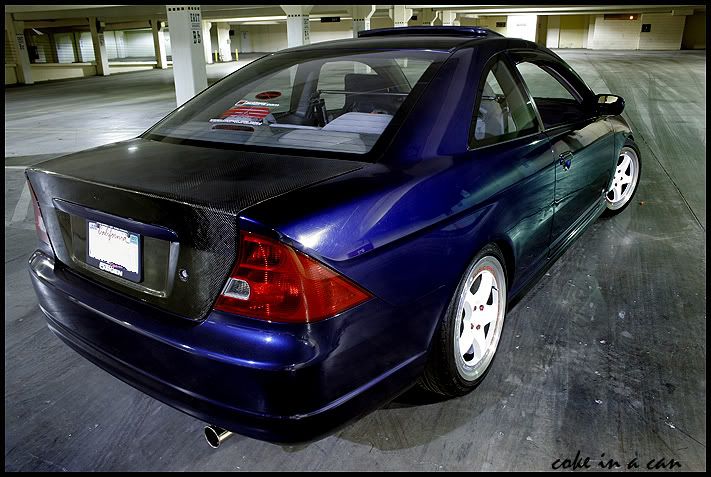
When shooting at night or in a parking garage, light is coming from many different places. Simply try and position yourself and the car in such a way that the most light is hitting it from the direction behind you and to one side. Sillhouetting may occur in some lighting situations, but that may be OK... just remember we want to see your car, not it's outline.


Angle
The best way to describe good angles is to give some examples. Try getting as close to a corner as you can while still seeing the entire car. Look down from a balcony. Shoot straight at it. Experiment. Now of course all of these rules can be bent or broken and have stunning results, but try and grasp the foundation before trying to get too funky.


ADVANCED CONTROL
by drew22mader


Aperture
The aperture controls the amount of light that reaches a digital camera's sensor (CCD). An aperture acts much like the pupil of an eye. The pupil opens wider as light decreases, letting in more of the available light. The pupil gets smaller when the amount of light increases to reduce the amount of light entering the eye.
The combination of aperture and shutter speed are related, and effect the exposure value. The faster the shutter speed, the larger the opening of the lens (ie. smaller aperture number) and visa versa. All digital cameras have exposure modes that automatically control the aperture as well as shutter speed.
F-stops

The diameter of an aperture is measured in f-stops. A lower f-stop number opens the aperture and admits more light onto the camera sensor. Higher f-stop numbers make the camera's aperture smaller so less light hits the sensor. When an aperture is opened up by one f- stop, the amount of light which reaches the sensor is doubled. F-stops are expressed in three different ways: f/8, f-8, and 1:8.
Aperture Priority Mode
Many intermediate and all advanced digital cameras allow you to manually change the aperture. When using aperture priority mode, you change the aperture the shutter speed also is automatically changed to maintain proper exposure. Aperture settings affect depth of field (DOF), how much of a photo is in focus when the camera is focused on the main subject.
ISO (Sensitivity)
ISO is the number indicating a digital camera sensors sensitivity to light. The higher the sensitivity, the less light is needed to make an exposure. Digital cameras automatically select the ISO but most have a setting to change it manually. Auto ISO generally works best for bright scenes.
Shooting at a lower ISO number requires more light than shooting at a higher number. Lower numbers result in images with the least visible noise, which is desirable. The higher the number, the more noise. The amount and degree of noise varies from camera to camera.
Digital single reflex cameras (dSLR), because they have larger sensors, are best for producing noise-free images. However, some consumer digital cameras now have improved sensors that produce acceptable images at higher ISO numbers.
ISO settings
AUTO - digital camera automatically sets the ISO speed according the the brightness of the scene, increasing or decreasing the sensitivity. User has no control over which ISO number is used.
ISO 100 - for extra sensitivity with little, if any, reduced image quality.
ISO 200 - cloudy and overcast days. Acceptable image quality, with some visible noise.
ISO 400 and above - suitable for indoor photography whether or not a flash is used. Also used for low lighting areas.
Changing ISO also changes the aperture and shutter speed.
Shutter speed
Shutter speed is the amount of time the shutter remains open to allow light to reach a digital camera sensor. Shutter speed is measured in seconds, or fractions of seconds.
Using very fast shutter speeds "freeze" fast-moving subjects, such as birds in flight. Slow shutter speeds are used to intentionally capture the movement of a subject.
Shutter Speed: 1/60th

Shutter Speed: 1 Sec

How an image is exposed is determined by the combination of the lens aperture and shutter speed. A fast shutter speed will use a larger aperture (small F-stop number) to avoid an under-exposed image. A slow shutter speed requires a small aperture (large F-stop number) to avoid over-exposure.
Typical shutter speeds are: 1/2000 sec, 1/500 sec, 1/250 sec, 1/125 sec, 1/60 sec, 1/30 sec, 1/15 sec, 1/8 sec, 1/4 sec, 1/2 sec and 1 second.
A tripod should be used when taking long exposures to prevent camera shake. Also, when using shutter speeds below 1/60th of a second without image stabilization, a camera tripod should be used.
Shutter Priority Mode
Shutter Priority mode is a semi-automatic exposure mode. You select the shutter speed and the camera automatically sets the aperture for a proper exposure.
For digital cameras without Shutter Priority, use Sports or Fast Shutter mode.
Depth Of Field
Depth of field is the amount of distance between the nearest and farthest objects that appear in acceptably sharp focus in a photograph. A preferred selection Depth of field ("DOF") in a focused subject in an image can be quite subjective. Remember this, adequate selection of DOF for one situation, application may be unacceptable for another photographer. It is all a matter of personal preference when trying to determine the appropriate use of DOF to enhance an effect in a photograph. This region is greater behind the point of focus than it is in front, as the angle of the light rays change more rapidly. Post processing can also increase the depth of field of a photograph by combining images from multiple shots at different focus depths.
The Focus is on the first License Plate Bolt, while everything behind it is out of focus.

In the next photo, the other bolt is now in focus, leaving everything before it out of focus and everything behind it out of focus as well.

PHOTOSHOP AND POST-PROCESSING
by dirtySAMURAI
Some of you may have experience with Adobe Photoshop. Most of you, I will guess, will have had no experience with it, but have at least heard of the program. This program allows you to vent your creativity with a vast assortment of tools and filters (most of which I never use). The most important things you should remember are the layers palette and tools palette (img. 1). If you do not own this program, do not fret. You can download a trial version of the software on Adobe's website, but to gain full functionality of it, you must purchase a license or the full software from a retail store.

Anyways, now that you have the software, open up one of your pictures that you want to edit. In this particular example, we have a picture (photograpy: dirtySAMURAI.com) of a member's Civic. Notice how bland the picture looks. What we want to do is edit all the unnecessary things from the picture, and add a little bit of spice. We want the subject to stand out over everything else in the picture, but at the same time we do not want to lose any details of the colors, textures, lines, etc. Also note that the sky is VERY white. In real life, the sky was a very vibrant orange/red with streaks of blue and purple. You can also see dirtySAMURAI's Miata in the back. We need to get rid of it.

Create a copy of the background layer by click-dragging the Background layer to the bottom of the layer palette, on top of the 2nd image to the right (img 3). Using the Shadow/Highlight tool (Image -> Adjustments -> Shadow/Highlight...), you can bring out the shadows of the image and at the same time decrease the amount of highlights ruining your picture (img 4). We can also start using the stamp tool to get rid of dots in the sky and the Miata in the background. The stamp tool is located on the tools palette, 5th row down, first column. Make a new layer, hold down Alt (on your keyboard) and click on a spot next to the bothersome object. Release Alt, and now you can stamp over the object.


Now that the Miata is out of the way we want to make the sky looks super cool and sort of give the ground in front of the Civic a glow - this is to make it look like we used auxiliary lighting, or external flashes, as we like to call them. This is accomplished by using the dodge tool - 7th row down, 2nd column in the tools palette. If it's not there, click and hold your mouse button over the image in the 7th row, 2nd column until a pop up menu appears next to the image. Select Dodge Tool. Set the Exposure value to something around 10-15%. Levels can also be used at this stage (press CTRL+L) (img 5):

Create a new layer (click the button that you used before to copy the background layer). Using the stamp tool again, and zooming in on the picture, we can now get rid of door dings and other unwanted dips and stuff from the body work (img 6, 7):


Now do some more fiddly stuff with layers, gradients, curves, levels, colors, etc and you might end up with something insanely cool looking. Remember, the sky is the limit.


Here is a new little clip with some pointers posted recently by another contributer:[/SIZE]
Post #71
If anyone has any questions they want to ask us about all things photography - just reply here or PM one of us and we'll do our best to help in any way we can. This post will also be updated in the future to include more sections, details, techniques, etc. Thanks for reading!
At the end of the guide is a link to some new pointers! A bigger, better update coming soon with the new weather!
AUTOMOTIVE PHOTOGRAPHY
by
LogicWavelengthdrew22mader anddirtySAMURAIThis guide will follow through a few concepts which are key to taking good photographs in general, but more specifically... pictures of our cars. The first section is on basic composition, as anyone with a point-and-shoot can at least aim properly. The second section is for those lucky enough to have a dSLR or at least an advanced P&S. The final section is a walkthrough on some tips and tricks for post-processing in Adobe PhotoShop.
COMPOSITION
by LogicWavelength
Location
The first thing you need to consider is location. Never take a picture of your car with a busy background. It should always be something neutral, or at least something that draws your attention to the car. Tunnels, forests/trees, parking garages or an alleyway are popular choices among amatuers as well as the magazines.
Next, position your car at an angle you like (obviously move yourself as well as the car for more shots) and angle the front wheels so that the wheel is facing you, not the tire tread.
The Rule of Thirds
This is a big one. When viewing a photograph, imagine making it a grid of 9 sections... basically... cutting in 3rds top to bottom and left to right. You always want to place the subject on one of these imaginary lines.... NEVER, EVER IN THE MIDDLE. It leads to a more interesting visual setup and will instantly make you look like you know what the heck you're doing. Some things to make note of... always leave the empty space in front of the car. It's your choice to have the car in the top 3rd or the bottom 3rd, but always have the extra space in front. This concept is called "walking room" or "leading the subject" (in video). However, in some cases its OK to center one of the two axis - but always have at least one at a 3rd.
Lighting
SUNRISE/SUNSET. This should be the only two words in this segment, but I feel the need to elaborate slightly. Sunrise and sunset provide the best lighting. Period. Here's an example of a rear shot of two black cars... one shot during broad daylight followed by a professional shot at sunset.
Get it?
Now that we've established when you're taking your photos, how about where to stand. Take a look at this diagram I made as the following explanation will make more sense.
Generally keep the sun at your back and slightly to one side or the other. Now - you want the broad side of the car (the side you see) to have the light hitting it. Beyond that - move around to get interesting reflections on your paintjob or interesting angles of the car and it's background.
Night time and indirect light (parking garages)
When shooting at night or in a parking garage, light is coming from many different places. Simply try and position yourself and the car in such a way that the most light is hitting it from the direction behind you and to one side. Sillhouetting may occur in some lighting situations, but that may be OK... just remember we want to see your car, not it's outline.
Angle
The best way to describe good angles is to give some examples. Try getting as close to a corner as you can while still seeing the entire car. Look down from a balcony. Shoot straight at it. Experiment. Now of course all of these rules can be bent or broken and have stunning results, but try and grasp the foundation before trying to get too funky.
ADVANCED CONTROL
by drew22mader
Aperture
The aperture controls the amount of light that reaches a digital camera's sensor (CCD). An aperture acts much like the pupil of an eye. The pupil opens wider as light decreases, letting in more of the available light. The pupil gets smaller when the amount of light increases to reduce the amount of light entering the eye.
The combination of aperture and shutter speed are related, and effect the exposure value. The faster the shutter speed, the larger the opening of the lens (ie. smaller aperture number) and visa versa. All digital cameras have exposure modes that automatically control the aperture as well as shutter speed.
F-stops
The diameter of an aperture is measured in f-stops. A lower f-stop number opens the aperture and admits more light onto the camera sensor. Higher f-stop numbers make the camera's aperture smaller so less light hits the sensor. When an aperture is opened up by one f- stop, the amount of light which reaches the sensor is doubled. F-stops are expressed in three different ways: f/8, f-8, and 1:8.
Aperture Priority Mode
Many intermediate and all advanced digital cameras allow you to manually change the aperture. When using aperture priority mode, you change the aperture the shutter speed also is automatically changed to maintain proper exposure. Aperture settings affect depth of field (DOF), how much of a photo is in focus when the camera is focused on the main subject.
ISO (Sensitivity)
ISO is the number indicating a digital camera sensors sensitivity to light. The higher the sensitivity, the less light is needed to make an exposure. Digital cameras automatically select the ISO but most have a setting to change it manually. Auto ISO generally works best for bright scenes.
Shooting at a lower ISO number requires more light than shooting at a higher number. Lower numbers result in images with the least visible noise, which is desirable. The higher the number, the more noise. The amount and degree of noise varies from camera to camera.
Digital single reflex cameras (dSLR), because they have larger sensors, are best for producing noise-free images. However, some consumer digital cameras now have improved sensors that produce acceptable images at higher ISO numbers.
ISO settings
AUTO - digital camera automatically sets the ISO speed according the the brightness of the scene, increasing or decreasing the sensitivity. User has no control over which ISO number is used.
ISO 100 - for extra sensitivity with little, if any, reduced image quality.
ISO 200 - cloudy and overcast days. Acceptable image quality, with some visible noise.
ISO 400 and above - suitable for indoor photography whether or not a flash is used. Also used for low lighting areas.
Changing ISO also changes the aperture and shutter speed.
Shutter speed
Shutter speed is the amount of time the shutter remains open to allow light to reach a digital camera sensor. Shutter speed is measured in seconds, or fractions of seconds.
Using very fast shutter speeds "freeze" fast-moving subjects, such as birds in flight. Slow shutter speeds are used to intentionally capture the movement of a subject.
Shutter Speed: 1/60th
Shutter Speed: 1 Sec
How an image is exposed is determined by the combination of the lens aperture and shutter speed. A fast shutter speed will use a larger aperture (small F-stop number) to avoid an under-exposed image. A slow shutter speed requires a small aperture (large F-stop number) to avoid over-exposure.
Typical shutter speeds are: 1/2000 sec, 1/500 sec, 1/250 sec, 1/125 sec, 1/60 sec, 1/30 sec, 1/15 sec, 1/8 sec, 1/4 sec, 1/2 sec and 1 second.
A tripod should be used when taking long exposures to prevent camera shake. Also, when using shutter speeds below 1/60th of a second without image stabilization, a camera tripod should be used.
Shutter Priority Mode
Shutter Priority mode is a semi-automatic exposure mode. You select the shutter speed and the camera automatically sets the aperture for a proper exposure.
For digital cameras without Shutter Priority, use Sports or Fast Shutter mode.
Depth Of Field
Depth of field is the amount of distance between the nearest and farthest objects that appear in acceptably sharp focus in a photograph. A preferred selection Depth of field ("DOF") in a focused subject in an image can be quite subjective. Remember this, adequate selection of DOF for one situation, application may be unacceptable for another photographer. It is all a matter of personal preference when trying to determine the appropriate use of DOF to enhance an effect in a photograph. This region is greater behind the point of focus than it is in front, as the angle of the light rays change more rapidly. Post processing can also increase the depth of field of a photograph by combining images from multiple shots at different focus depths.
The Focus is on the first License Plate Bolt, while everything behind it is out of focus.
In the next photo, the other bolt is now in focus, leaving everything before it out of focus and everything behind it out of focus as well.
PHOTOSHOP AND POST-PROCESSING
by dirtySAMURAI
Some of you may have experience with Adobe Photoshop. Most of you, I will guess, will have had no experience with it, but have at least heard of the program. This program allows you to vent your creativity with a vast assortment of tools and filters (most of which I never use). The most important things you should remember are the layers palette and tools palette (img. 1). If you do not own this program, do not fret. You can download a trial version of the software on Adobe's website, but to gain full functionality of it, you must purchase a license or the full software from a retail store.
Anyways, now that you have the software, open up one of your pictures that you want to edit. In this particular example, we have a picture (photograpy: dirtySAMURAI.com) of a member's Civic. Notice how bland the picture looks. What we want to do is edit all the unnecessary things from the picture, and add a little bit of spice. We want the subject to stand out over everything else in the picture, but at the same time we do not want to lose any details of the colors, textures, lines, etc. Also note that the sky is VERY white. In real life, the sky was a very vibrant orange/red with streaks of blue and purple. You can also see dirtySAMURAI's Miata in the back. We need to get rid of it.
Create a copy of the background layer by click-dragging the Background layer to the bottom of the layer palette, on top of the 2nd image to the right (img 3). Using the Shadow/Highlight tool (Image -> Adjustments -> Shadow/Highlight...), you can bring out the shadows of the image and at the same time decrease the amount of highlights ruining your picture (img 4). We can also start using the stamp tool to get rid of dots in the sky and the Miata in the background. The stamp tool is located on the tools palette, 5th row down, first column. Make a new layer, hold down Alt (on your keyboard) and click on a spot next to the bothersome object. Release Alt, and now you can stamp over the object.
Now that the Miata is out of the way we want to make the sky looks super cool and sort of give the ground in front of the Civic a glow - this is to make it look like we used auxiliary lighting, or external flashes, as we like to call them. This is accomplished by using the dodge tool - 7th row down, 2nd column in the tools palette. If it's not there, click and hold your mouse button over the image in the 7th row, 2nd column until a pop up menu appears next to the image. Select Dodge Tool. Set the Exposure value to something around 10-15%. Levels can also be used at this stage (press CTRL+L) (img 5):
Create a new layer (click the button that you used before to copy the background layer). Using the stamp tool again, and zooming in on the picture, we can now get rid of door dings and other unwanted dips and stuff from the body work (img 6, 7):
Now do some more fiddly stuff with layers, gradients, curves, levels, colors, etc and you might end up with something insanely cool looking. Remember, the sky is the limit.
Here is a new little clip with some pointers posted recently by another contributer:[/SIZE]
Post #71
If anyone has any questions they want to ask us about all things photography - just reply here or PM one of us and we'll do our best to help in any way we can. This post will also be updated in the future to include more sections, details, techniques, etc. Thanks for reading!
Last edited by LogicWavelength; 09-11-2007 at 09:38 AM.


 09-24-2006
#6
 There is gl@ss in my @SS...
Hey! Look At Me!! I'm a Supporting Member!!
iTrader: (9)

Join Date: Apr 2005
Location: Portsmouth, Ohio
Age: 39
Posts: 5,066
Likes: 0
Received 0 Likes
on
0 Posts
Rep Power: 296 Your welcome guys, we're just giving back to the site to try and help others. We put some time in this trying to give you the best knowledge that we use to shoot.


 09-24-2006
#11
09-24-2006
#12
I log in from time to time
Hey! Look At Me!! I'm a Supporting Member!!
iTrader: (31)

Join Date: Sep 2003
Location: VA
Age: 37
Posts: 15,682
Likes: 0
Received 2 Likes
on
2 Posts
Rep Power: 410 even if your camera doesnt have any of the advanced controls, it should still allow you some settings like exposure compensation (+/-2EV, or thereabouts), and color settings.
anyhoot, thanks logic for finally posting this
anyhoot, thanks logic for finally posting this
 09-24-2006
#14
There is gl@ss in my @SS...Hey! Look At Me!! I'm a Supporting Member!!
iTrader: (9)
Join Date: Apr 2005
Location: Portsmouth, Ohio
Age: 39
Posts: 5,066
Likes: 0
Received 0 Likes
on
0 Posts
Rep Power: 296 damn Falken, i love the sound of that, and thank you alot. We'll be posting up more stuff to further help.

 09-24-2006
#17
Premium Member
Hey! Look At Me!! I'm a Supporting Member!!
iTrader: (95)

Join Date: Sep 2002
Location: NV
Age: 43
Posts: 51,241
Likes: 0
Received 18 Likes
on
13 Posts
Rep Power: 787 well i suck i went out took tons of pics and barely got two that turned out "okay" the problem is either the car washes out overexposed or color isnt right, or something weird with the headlights looking like theyre not real. comments of these? idk how to improve, and its hard getting some of these cause its either areas where no cars are allowed or stupid people drive by and watch you. well actually this is the ONE pic i think came out good..

09-24-2006
#18
7th Gen Photographer
Thread Starter
iTrader: (2)
Join Date: Mar 2004
Location: Atlantic City, NJ
Age: 40
Posts: 951
Likes: 0
Received 0 Likes
on
0 Posts
Rep Power: 255
Originally Posted by gearbox
well i suck i went out took tons of pics and barely got two that turned out "okay" the problem is either the car washes out overexposed or color isnt right, or something weird with the headlights looking like theyre not real. comments of these? idk how to improve, and its hard getting some of these cause its either areas where no cars are allowed or stupid people drive by and watch you. well actually this is the ONE pic i think came out good..
09-24-2006
#19
What happened to this forum?
iTrader: (2)

Join Date: Nov 2004
Location: FTW, TX
Age: 39
Posts: 455
Likes: 0
Received 0 Likes
on
0 Posts
Rep Power: 242 You guys should also include a section about apertures and depth of field and how they correlate... Could be helpful. Rep for you all.
:Edit: dirtySamurai I'll have to get you later. Won't let me rep.
:Edit: dirtySamurai I'll have to get you later. Won't let me rep.
Last edited by silv3rciv; 09-24-2006 at 07:22 PM.
09-24-2006
#20
Premium Member
Hey! Look At Me!! I'm a Supporting Member!!
iTrader: (95)
Join Date: Sep 2002
Location: NV
Age: 43
Posts: 51,241
Likes: 0
Received 18 Likes
on
13 Posts
Rep Power: 787 okay lemme know if this is good i spent hours on it!!! lol
AFTER -Tons of color adjustments, lots of buildings and telephone poles and trash cleanup, fixed the front wheel shine and exhaust, glow around car, etc-

AFTER -Tons of color adjustments, lots of buildings and telephone poles and trash cleanup, fixed the front wheel shine and exhaust, glow around car, etc-
Last edited by gearbox; 09-24-2006 at 09:14 PM.
09-24-2006
#21
There is gl@ss in my @SS...Hey! Look At Me!! I'm a Supporting Member!!
iTrader: (9)
Join Date: Apr 2005
Location: Portsmouth, Ohio
Age: 39
Posts: 5,066
Likes: 0
Received 0 Likes
on
0 Posts
Rep Power: 296 Only thing that doesn't look right is the halo around the whole car. Try not so much on the rear and more from the side of the car. The car and the ground should resemble the fake lighting, so if there is light on the ground from the back of the car, make sure you lightin up the rear of the car as well, or the side. If not it will just appear as a halo around it. Stamping the wires and poles turned out great though. 
09-24-2006
#22
7th Gen Photographer
Thread Starter
iTrader: (2)
Join Date: Mar 2004
Location: Atlantic City, NJ
Age: 40
Posts: 951
Likes: 0
Received 0 Likes
on
0 Posts
Rep Power: 255 NEW SECTION - "Depth of Field" added under advanced controls! In the future, I will add the tag "UPDATED - (date)" for future add-ons, but considering this is the same day, it remains the same.
09-24-2006
#24
7th Gen Photographer
Thread Starter
iTrader: (2)
Join Date: Mar 2004
Location: Atlantic City, NJ
Age: 40
Posts: 951
Likes: 0
Received 0 Likes
on
0 Posts
Rep Power: 255 gearbox... getting better man! Study some photos on JTuned.com - see what makes them good angles... like how is the car placed within the bounds of the photo? Look at the lighting and see why it hits the car as it does, where is the sun, etc.
After all that - go and read http://www.photo.net/learn - it'll teach you ALOT about photography.
Then once ALL THAT is accomplished... go out and take 100,000 pictures of your car in 20 different locations and lighting situations. In other words: practice more! And for God's sake - keep me updated!
After all that - go and read http://www.photo.net/learn - it'll teach you ALOT about photography.
Then once ALL THAT is accomplished... go out and take 100,000 pictures of your car in 20 different locations and lighting situations. In other words: practice more! And for God's sake - keep me updated!
 09-24-2006
#26
The blackbeauty ES1.

Join Date: Feb 2005
Location: toronto.
Age: 38
Posts: 986
Likes: 0
Received 0 Likes
on
0 Posts
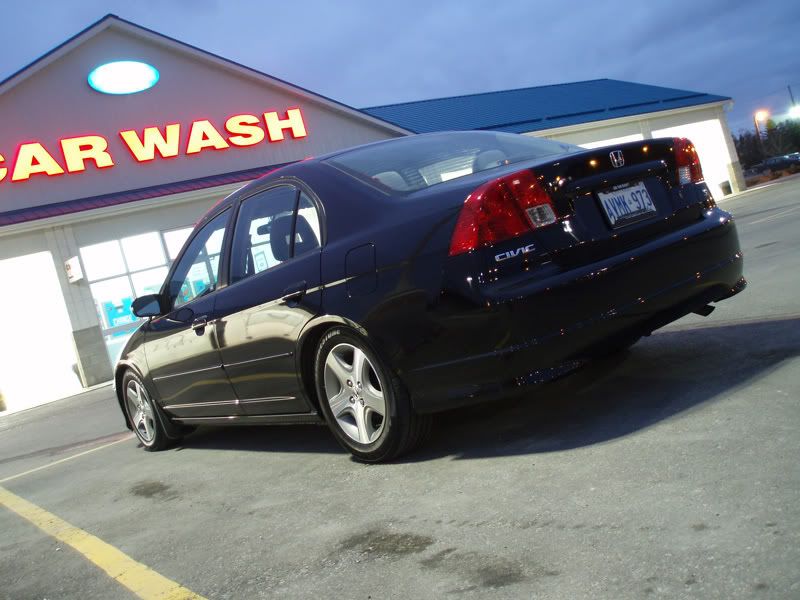
Rep Power: 0 Awsome info! Big thanks goes to LogicWavelength, Drew22mader, and dirtySAMURAI. So after reading this, i tried to apply what I learned onto one of my older photos. I'll take some more in the next week and hopefully the photos turn out awsome with this guide!
Anyways, heres a pic of the original and the edit I did with photoshop. All i did was use the adjustments to change the curves, exposer, shadow/highlight, and the dodge tool.(Which I never knew what hell that even was before!) I went a little crazy because i wanted to see what everything did.
Original:
Edit:
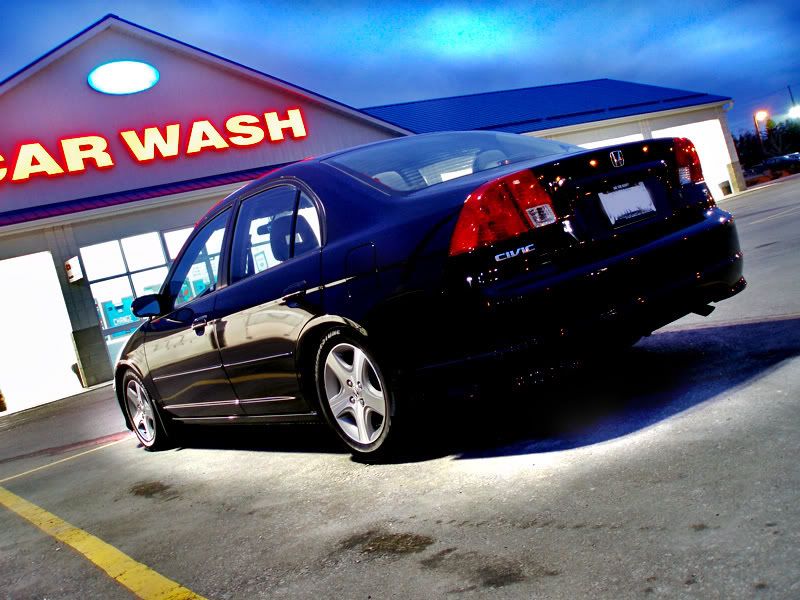
What do you guys think?
Anyways, heres a pic of the original and the edit I did with photoshop. All i did was use the adjustments to change the curves, exposer, shadow/highlight, and the dodge tool.(Which I never knew what hell that even was before!) I went a little crazy because i wanted to see what everything did.
Original:
Edit:
What do you guys think?
09-24-2006
#27
There is gl@ss in my @SS...Hey! Look At Me!! I'm a Supporting Member!!
iTrader: (9)
Join Date: Apr 2005
Location: Portsmouth, Ohio
Age: 39
Posts: 5,066
Likes: 0
Received 0 Likes
on
0 Posts
Rep Power: 296 Sujak, sometimes i twick it a bit, some things just need that extra sharpness.
Jhonsok, i think the edited pic really looks alot better, and not so washed out from the harsh fluorescent lighting. Although, one thing, like Logic had stated, you wanna see the details of the car and not just an outlight, upon darkening it up you also lost alot of detail. Next time try shooting a couple different exposures, try getting one over exposed, middle, and overexposed, kinda like an HDR image would do. But then work with all 3 of them and getting correct exposure over the 3 and combine them. If you are going to use the halo effect, make sure you don't wrap the lighting around because lighting not only hits the ground, but also the car, the car is dark and the ground is light. Try using the dodge tool a little less on the ground. Adjust the highlights and shadows too when doin it. Best thing to do is this, take tons of pictures, just sit and look at how light bends on the car, what light his where, you ever see people make a square with their hands? do that, you will see what your gonna see through the lens. Hope this helped you and others.
Jhonsok, i think the edited pic really looks alot better, and not so washed out from the harsh fluorescent lighting. Although, one thing, like Logic had stated, you wanna see the details of the car and not just an outlight, upon darkening it up you also lost alot of detail. Next time try shooting a couple different exposures, try getting one over exposed, middle, and overexposed, kinda like an HDR image would do. But then work with all 3 of them and getting correct exposure over the 3 and combine them. If you are going to use the halo effect, make sure you don't wrap the lighting around because lighting not only hits the ground, but also the car, the car is dark and the ground is light. Try using the dodge tool a little less on the ground. Adjust the highlights and shadows too when doin it. Best thing to do is this, take tons of pictures, just sit and look at how light bends on the car, what light his where, you ever see people make a square with their hands? do that, you will see what your gonna see through the lens. Hope this helped you and others.
Last edited by drew22mader; 09-24-2006 at 10:29 PM.
09-24-2006
#29
Premium Member
Hey! Look At Me!! I'm a Supporting Member!!
iTrader: (95)
Join Date: Sep 2002
Location: NV
Age: 43
Posts: 51,241
Likes: 0
Received 18 Likes
on
13 Posts
Rep Power: 787 the other pic didnt look right so i found an old one i like. adjusted left turn signal to match, darkened headlights, tinted moonroof and windshield, cropped, removed front plate, lightened fogs, removed washer nozzles. i like it!


